Matter, Thread, Wi-Fi, Bluetooth, and Hubs: What Each Layer Means
Learn how a smart lock's radio, network, Matter controller, hub, bridge, and app fit together before checking ecosystem compatibility.
Jump to a section
A smart-lock compatibility label can describe its radio, network, protocol, hub, or app integration. Those are different parts of the connection. Identify each one before you decide whether a lock will work with the control, remote access, and automation you want.
The layers in plain language
| Term | What it does | What it does not prove |
|---|---|---|
| Wi-Fi | Connects a device to an IP network, commonly through a home router. | That the lock speaks Matter or is supported by a particular app. |
| Thread | A low-power IPv6 mesh network used by some smart-home devices. | That a Thread device includes a Matter controller or border router. |
| Ethernet | Connects a device to an IP network over a wired link; Matter fabrics can include Ethernet-connected devices. | That a particular smart lock has an Ethernet interface. |
| Matter | A smart-home application protocol that defines how compatible devices and controllers exchange commands and state. | That every controller exposes every lock feature. |
| Bluetooth Low Energy (BLE) | Often helps a phone discover and commission a nearby Matter device. | That Bluetooth is the lock’s normal remote-control path. |
| Zigbee and Z-Wave | Separate low-power smart-home networks that commonly use a compatible hub to connect an app or automation system to a lock. | That the lock uses Matter, or that every hub exposes the same lock actions. |
| Matter controller | Adds a device to a Matter fabric and sends commands. A fabric is the Matter network of devices and shared credentials. | That it routes Thread traffic or supplies every automation feature. |
| Thread border router | Connects a Thread network to the rest of the IP home network. | That it can commission or control a lock by itself. |
| Bridge | Exposes a device or system that uses another protocol through a Matter interface. | That the bridged device natively has a Matter radio or supports every Matter action. |
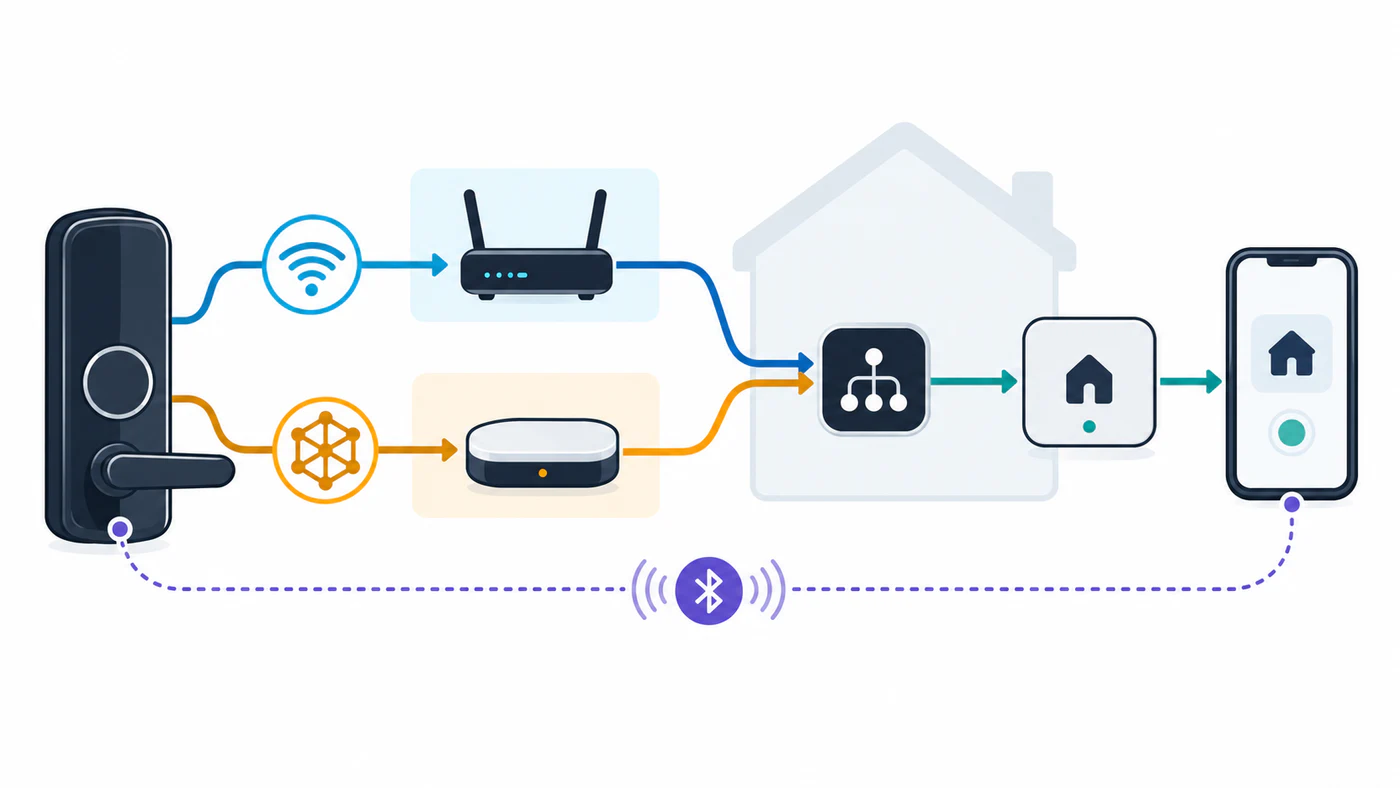
Wi-Fi, Thread, and Ethernet can carry Matter network traffic; Matter defines device commands and data. The lock examples here use Wi-Fi or Thread, while some other Matter devices connect over Ethernet. Check the exact lock’s documented interface rather than assuming it has a wired Ethernet connection. Zigbee and Z-Wave are other radio-network paths: their supported hub or bridge carries commands between the app or automation system and the lock. Those paths are not Matter simply because the same hub also supports Matter. The Z-Wave Alliance’s general path is app → hub → Z-Wave network → lock, with status returning through the hub. A Thread border router is needed for a Thread path to reach the rest of the home network. A Matter controller is still needed to commission and manage a Matter device. One physical hub may perform more than one job, but the terms describe separate roles.
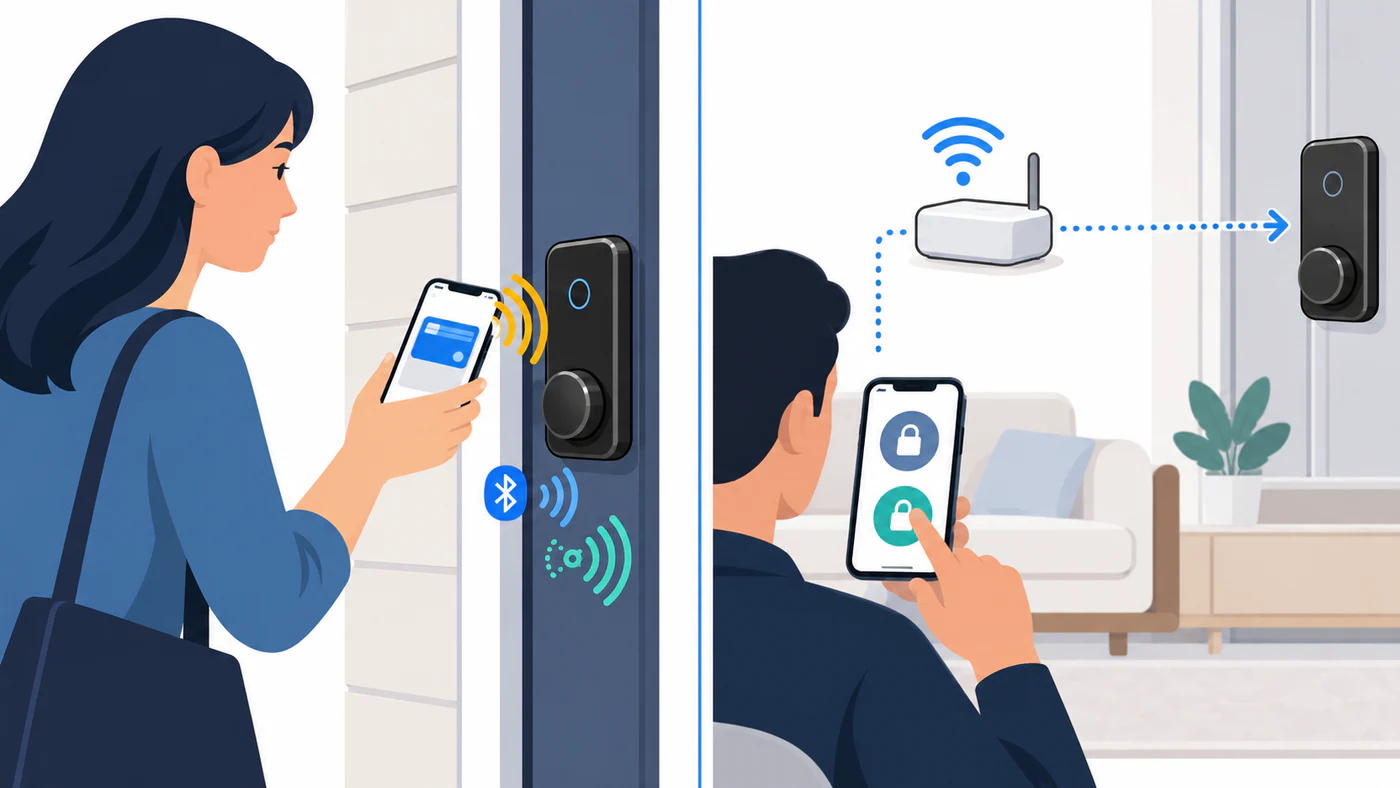
Bluetooth is commonly involved during commissioning, when a phone helps discover the lock and pass network or fabric information. It does not follow that day-to-day Matter commands travel over Bluetooth. Home Assistant’s Matter guidance describes BLE commissioning alongside control over Wi-Fi or Thread.
Aliro is a separate digital-access standard for credentials presented to an access reader. Its published methods include NFC tap, Bluetooth LE, and Bluetooth LE combined with UWB. Those methods do not replace Matter’s smart-home lock commands, and an Aliro or Matter label alone does not confirm that a particular lock, wallet, phone, market, or access method is supported. See Aliro digital home keys vs Matter smart-lock control for the exact checks.
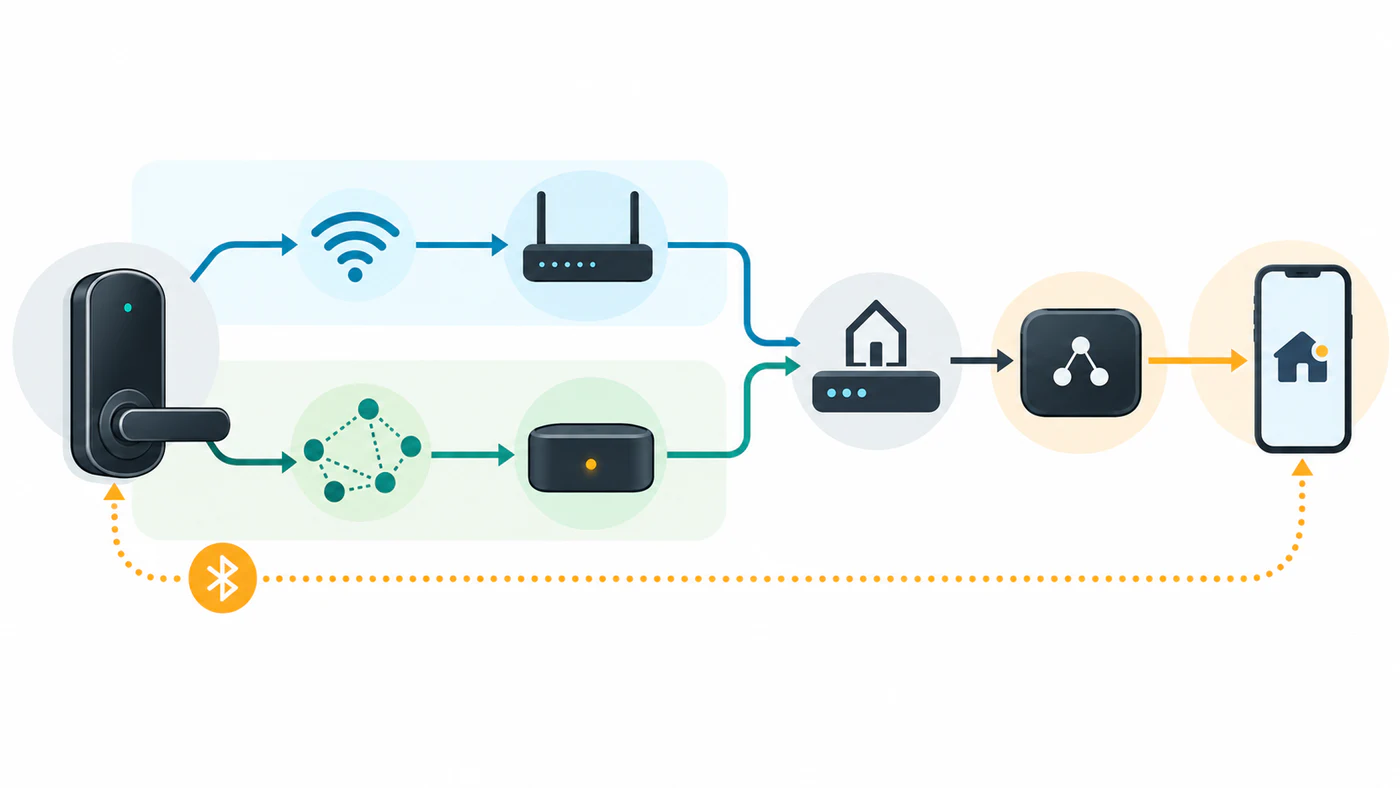
Follow the actual connection path
For a Wi-Fi Matter lock, the path is generally lock → Wi-Fi access point → IP home network → Matter controller. For a Thread Matter lock, it is lock → Thread mesh → Thread border router → IP home network → Matter controller. The app is a user interface to an ecosystem or controller; it may add its own cloud, remote-access, voice, or automation conditions.
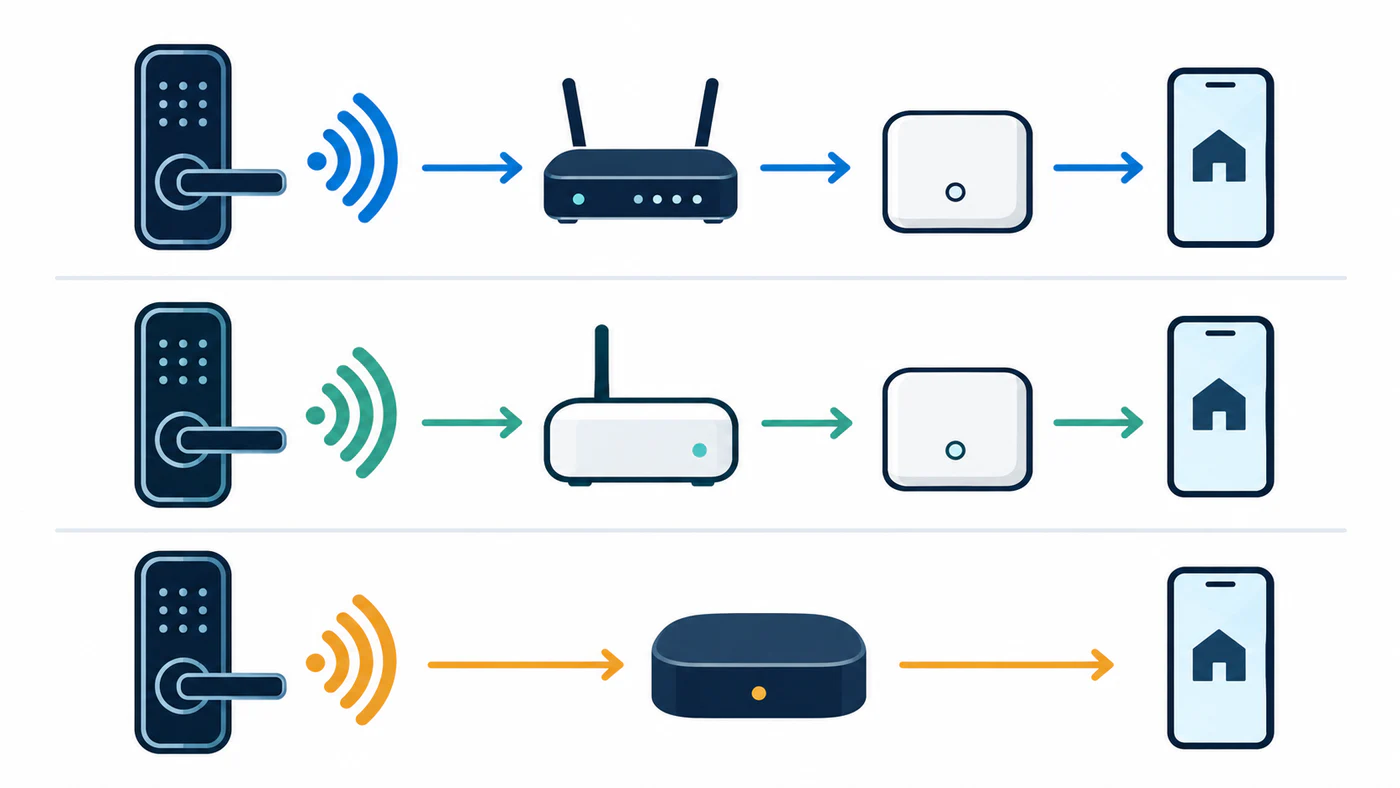
A bridge creates another kind of path. For example, Aqara says the U100 uses Zigbee and requires a compatible Aqara hub for its Matter path. SwitchBot describes using Hub 2 to expose a compatible SwitchBot Lock to Matter. In each case, the named hub mediates the path; neither example means that any Zigbee or Bluetooth lock becomes a Matter device through any hub. Confirm the exact lock, hub, and exposed actions in the manufacturer’s current instructions. Z-Wave locks likewise depend on a Z-Wave controller or hub; the Danalock V3 guide compares the V3’s separately listed radio variants.
Hubitat’s Matter guidance provides another role distinction: it describes Hubitat Elevation as a Matter controller rather than a Matter bridge, and says Matter-over-Thread needs an external Thread border router. Controller support alone does not show that a particular lock driver or lock feature is supported; verify the model and actions in the platform’s current device documentation.
Ask these questions before buying
- Which radio and network does this exact lock use: Wi-Fi, Thread, Ethernet, Bluetooth, or a proprietary connection?
- Does it speak Matter directly, or does a named bridge expose it to Matter?
- Which device is the Matter controller, and is it supported by the target ecosystem?
- If the lock uses Thread, which device is its border router?
- Does the ecosystem support the specific actions you need, including lock, unlock, PIN, remote control, and state?
The answers belong in separate columns when you compare products. A “Thread” mark answers a network question; a “Matter” mark answers a protocol question. Neither alone answers whether Google Home, Apple Home, Alexa, or another controller exposes secure remote unlock for a specific model.
A practical setup check
Commissioning is the process of adding a device to a Matter fabric. Before starting, install current lock firmware, check the controller’s compatibility page, and confirm the correct Wi-Fi or Thread network is available. Keep the QR or setup code private; it grants access to device commissioning. If a setup fails, record the exact error and check reachability, IPv6/multicast support, the Thread border-router path, and whether the lock is already paired elsewhere before factory-resetting it.
For ecosystem-specific controls, compare the feature matrix. For hubs, border routers, firmware, and commissioning checks, use the infrastructure guide. Tedee has a separate GO and GO2 Matter setup guide because its setup paths and accessory conditions are model-specific. Read the Danalock V3 connectivity guide before selecting a radio variant; its product page does not establish Matter support.
Reference material
Sources for this guide
- MatterPrimary
- Matter supportPrimary
- SwitchBot Hub 2Primary
- Aqara Smart Lock U100Primary
- Z-Wave for ConsumersPrimary
- How to use Matter on Hubitat ElevationPrimary
- Thread Border Router Device TypesAuthoritative secondary
- Introducing Aliro 1.0Primary