Tedee GO and GO2 Matter: Setup, Accessories, and Remote Access
Check Tedee GO and GO2 Matter setup routes, firmware, account state, accessory limits, and the network requirements for remote control.
Jump to a section
Tedee GO and GO2 can follow a Matter setup path with requirements that depend on the lock’s setup code, firmware, and Tedee account state. Matter access also has different accessory and remote-control conditions from the native Tedee app. Confirm the exact model and current instructions before you start.
Choose the setup route that matches the lock
Tedee’s current guide describes a setup-code route for eligible GO2 locks. If the lock has its printed Matter setup code and has not already been paired with a Tedee account, use the supported Matter controller’s scan flow. The printed-code route does not expose Tedee Bridge, Keypad Pro, or Door Sensor through Matter. Those accessories require the Tedee ecosystem path when you need their functions.
For a GO or GO2 without the printed Matter code, Tedee documents an app-assisted route that requires firmware 2.1.3493 or newer. Update the lock through the Tedee app, then follow the app’s Matter setup instructions. The account and firmware conditions matter: do not assume that a code from a different lock generation or an older firmware version will produce the same flow.
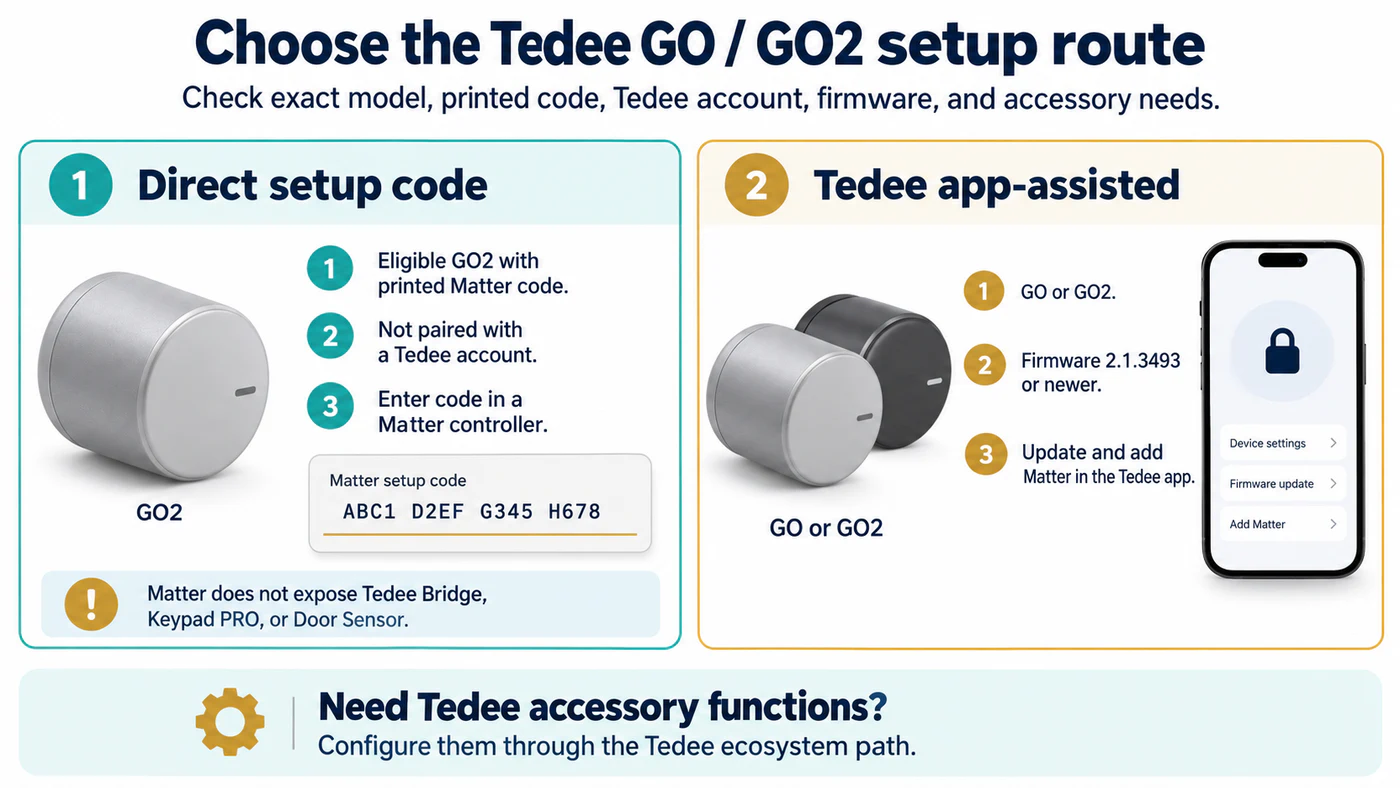
Tedee’s supplied Matter code cannot be scanned; use the controller’s code-entry flow.
Matter pairing adds the lock to the selected controller. It does not replace every Tedee app feature. Keep the native app and account available if you use Tedee-specific sharing, notifications, firmware updates, or accessories.
Plan for Thread and remote access
The Matter path for these locks uses Thread, so a Thread border router must connect the lock’s Thread network to the home IP network. The border router is infrastructure; the Matter controller is the service that commissions and controls the lock. A hub may perform both roles, but verify each role for the specific device.
Tedee’s instructions also specify NAT64 support for remote Matter control. Local operation after pairing and remote operation are separate checks. First test locking and unlocking on the local network. Then confirm that the controller, Thread border-router path, and home network support the remote route before relying on control while away. Tedee Bridge is optional for remote control through Matter, while the native Tedee app still uses Tedee’s own path for features such as sharing, push notifications, and updates.
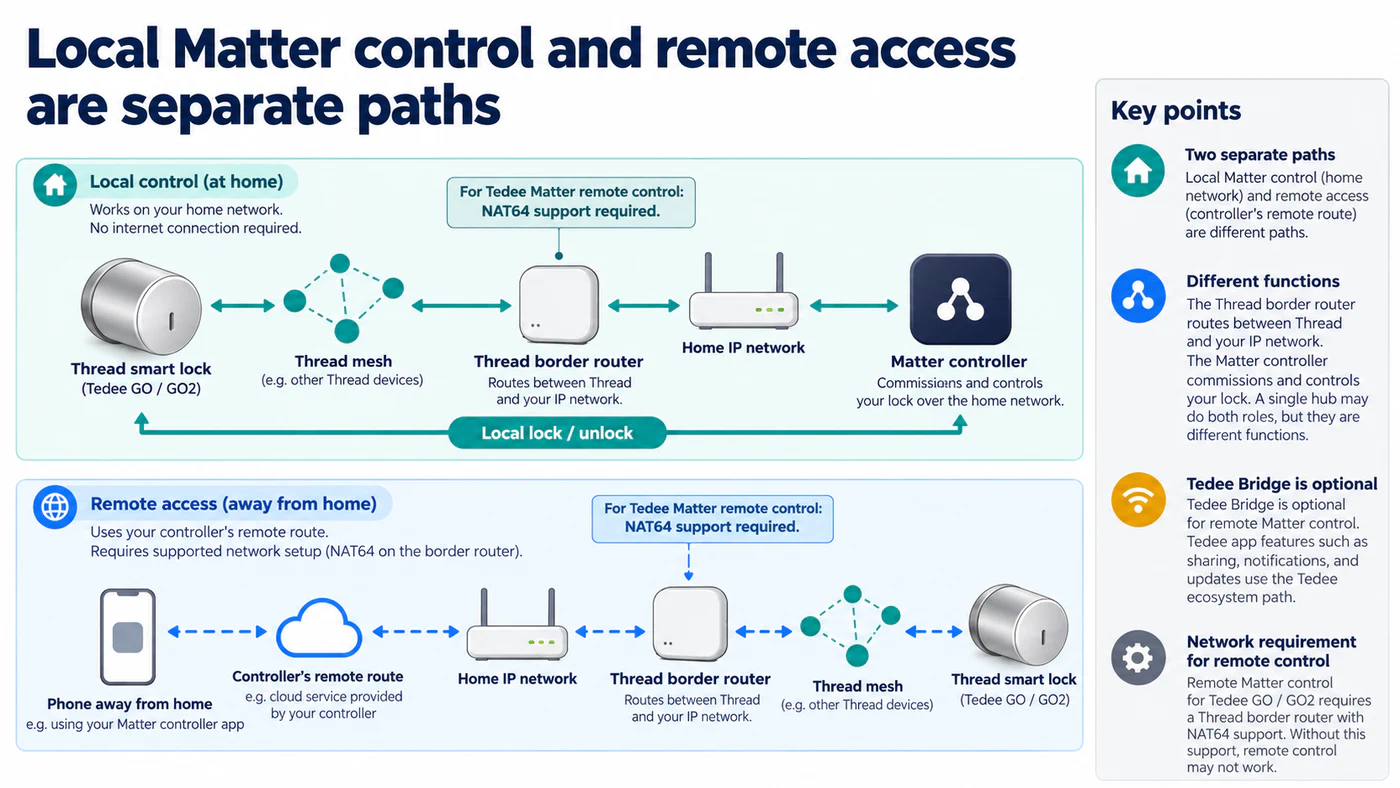
Test local lock and unlock first; remote Matter also depends on NAT64-capable Thread border-router support.
Verify the result feature by feature
After setup, check:
- The model and firmware shown in the Tedee app.
- Whether the lock appears in the intended Matter controller and responds to local lock and unlock commands.
- Whether the selected controller exposes any PIN, status, battery, or notification feature you need.
- Whether Tedee accessories still work through their supported Tedee path.
- Whether remote control works after local control has been confirmed.
- Whether firmware updates remain available through the Tedee app.
If the Matter flow cannot find the lock, check the account state, firmware, setup-code route, phone proximity, and Thread border router before resetting the lock. Preserve a working physical-entry method while troubleshooting. Matter compatibility is an electronic connection result; it does not establish that the lock fits a particular door.
Compare Tedee with other paths in the ecosystem feature matrix. For the general setup sequence, read hubs, border routers, firmware, and commissioning. Electronic compatibility does not establish door fit. Tedee specifies a Euro-profile cylinder with an emergency (double-clutch) function for GO: both keys can remain inserted, and turning one key must turn the other. Check Tedee’s GO cylinder requirements and the UK and European locks guide for broader cylinder checks. GO2 has separate cylinder and adapter requirements; use Tedee’s GO2 installation manual for that model. The GO requirement does not establish GO2 fit.
Reference material