Level Lock “Unable to Lock or Unlock” Error
Follow Level’s diagnostic order for its 3.5-second lock error, door friction, battery, and firmware.
Jump to a section
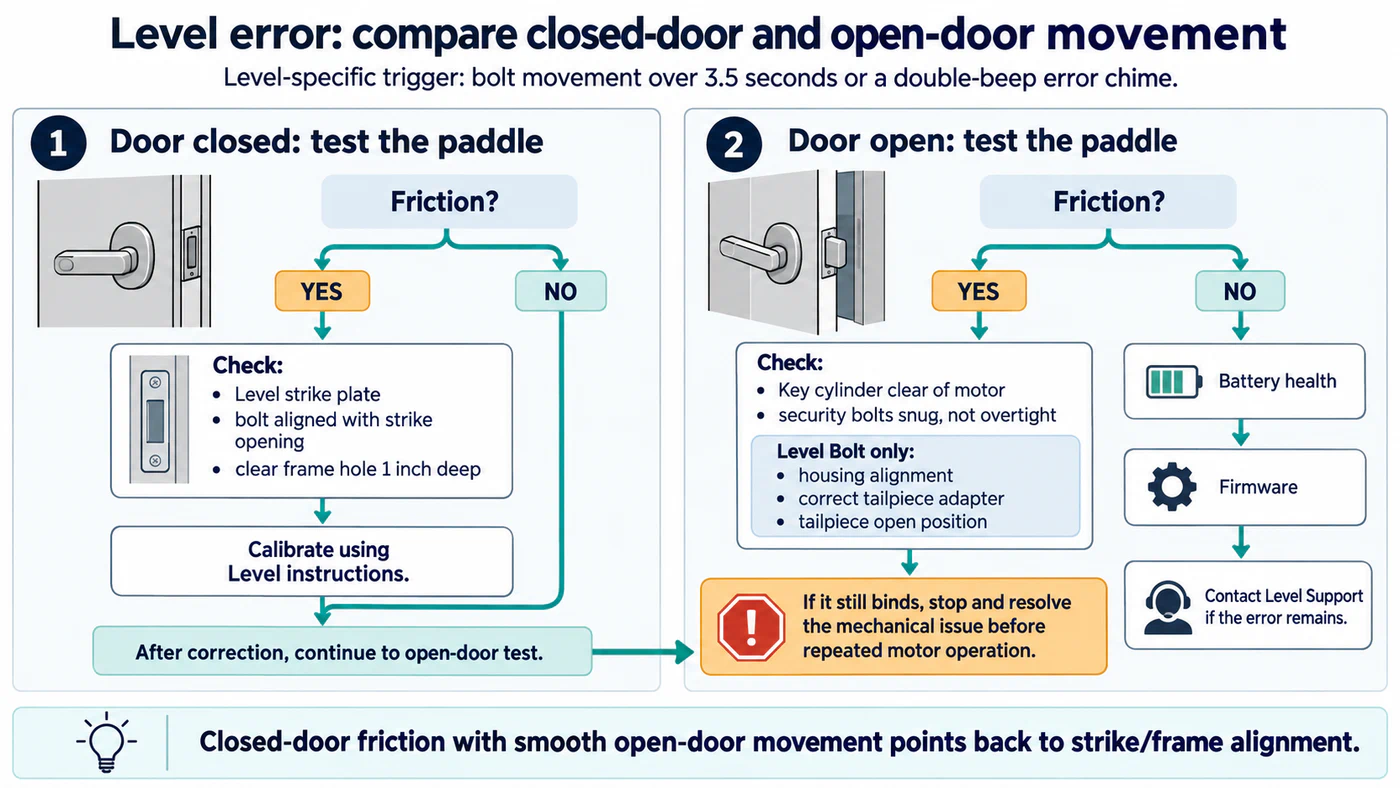
Level says its app reports this error when the lock takes longer than 3.5 seconds to extend or retract the bolt; the lock also gives a double-beep error chime. Treat that timing as Level’s diagnostic trigger, not a general smart-lock threshold. The checks below follow Level’s diagnostic order and apply to Level locks; confirm the procedure for your exact model in Level’s current support instructions.
Before testing, keep a dependable way to enter and leave. If the bolt binds or the lock’s state is uncertain, stop repeated commands and do not force the hardware.
Check the closed-door movement first
With the door closed, use the inside paddle to extend and retract the bolt as Level directs. If the movement feels resistant, inspect the door-to-frame path before checking the app again:
- Use the Level strike plate. Level says a third-party strike may not work properly with its lock.
- Check that the bolt lines up with the strike opening instead of pressing against its edge.
- Make sure the receiving hole in the frame is clear and reaches 1 inch deep, as Level specifies.
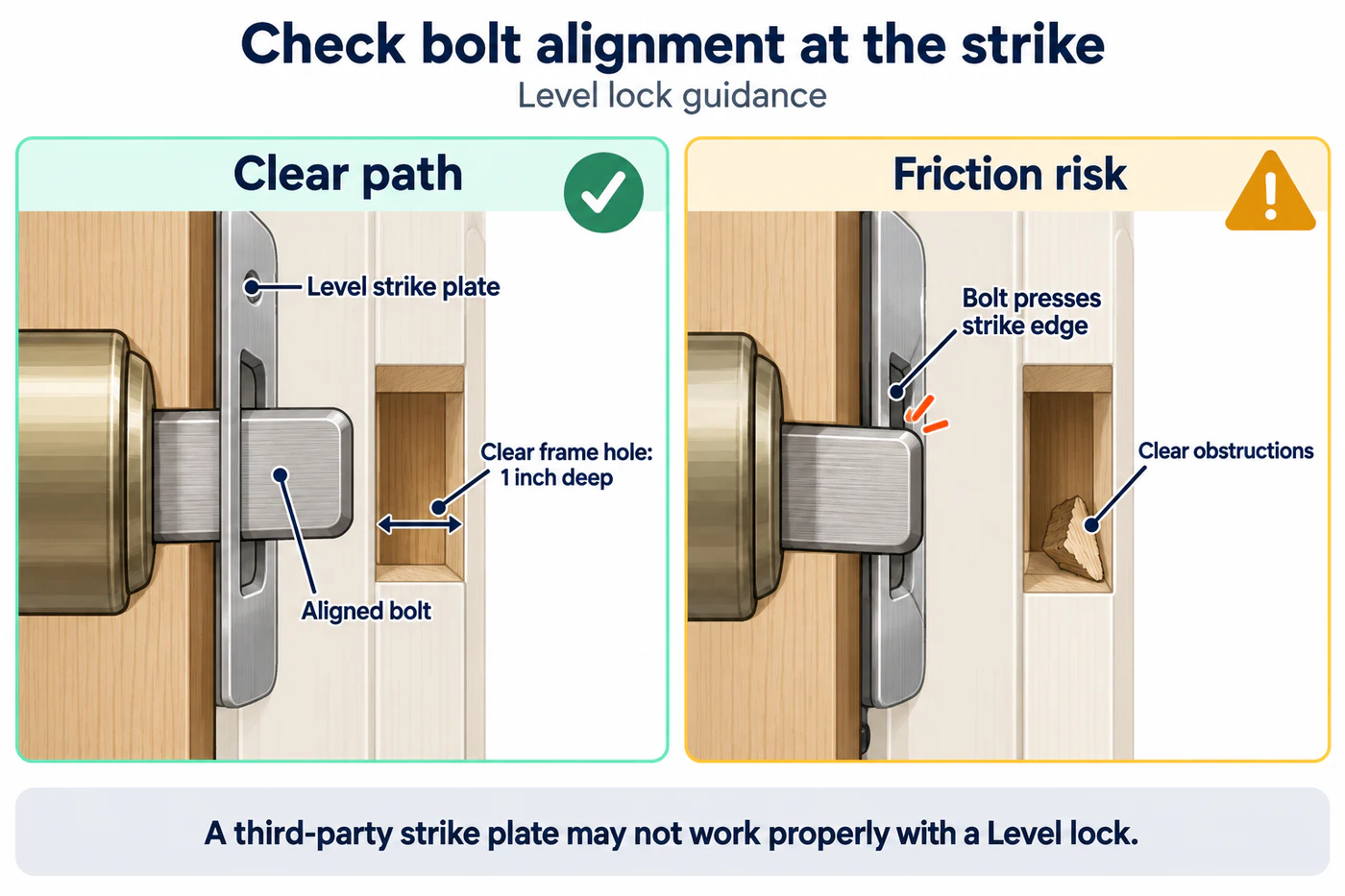
Correct only the fit issues you can verify safely. Then calibrate the lock using Level’s instructions before continuing to the open-door test below. Do not assume calibration can compensate for a bolt that still rubs or binds. For broader door and strike diagnosis, see door sag, strike pressure, and alignment.
Compare movement with the door open
If the closed-door test is smooth but the error remains, open the door and repeat the paddle test. If the bolt still feels resistant with the door open, Level directs you to check that the key cylinder clears the motor and that the security bolts are snug, not overtightened.
For Level Bolt only, Level’s separate incomplete-retraction guide gives additional checks in steps 5–7 for housing alignment, the correct tailpiece adapter, and the tailpiece’s open position. Those installation checks apply to Level Bolt and should not be transferred to other Level lock models. If the exact model or step is unclear, use Level support rather than adjusting parts by guesswork.
If the bolt moves freely with the door open but resists when closed, return to the strike and frame alignment. If it binds in either test, stop and resolve the mechanical issue before repeated motor operation. The general calibration and jam guide explains why a jam is different from an app or calibration problem.
Check power and firmware
After the physical checks, Level’s sequence moves to battery health and then firmware:
- Check the battery’s condition using Level’s current instructions and replace or recharge it only as the exact model requires. For general power symptoms, see battery and environmental checks.
- Check whether the lock has a firmware update available in the Level app and follow Level’s update instructions.
- If the same error remains, contact Level support with the exact lock model, the app error, whether resistance occurred with the door open or closed, and the checks already completed.
This path narrows the causes Level identifies: closed-door friction, open-door friction or installation clearance, battery condition, and firmware. It does not establish that every Level error has one of these causes. Keep the lock on a known-safe mechanical path until its operation and locked state are clear.
Reference material