Aqara U200 and U400: Matter, Thread, and Home Key Paths
Compare Aqara U200 and U400 Matter requirements with their separate Apple Home Key, UWB, and Samsung Wallet access paths.
Jump to a section
The Aqara U200 and U400 both support Matter over Thread, but their app and Apple access conditions differ. The U200 has a separate Aqara Home path and a third-party Matter path. The U400 adds an approach-unlock feature with specific Apple device and hub requirements. Identify the exact model before choosing a hub; one lock’s setup notes do not apply to the other.
Compare the documented paths
| Model | Aqara Home path | Third-party Matter path | Apple access notes |
|---|---|---|---|
| U200 | Aqara says basic Aqara Home use does not require a hub; it recommends an Aqara M3 Hub for remote control and automations. | Aqara’s FAQ requires a 2-in-1 Matter Controller and Thread Border Router. It also describes basic lock and unlock in third-party ecosystems. | Aqara documents Apple Wallet Home Key for the U200. Check the Apple device and iOS requirements for your specific setup. |
| U400 | The product page lists a range of Aqara Home functions, but the cited Matter and UWB requirements below are specific to those features. | Matter over Thread requires a Thread-enabled Matter controller for the ecosystem you choose. | UWB approach unlocking works only with selected iPhone and Apple Watch models and requires a Thread-enabled Apple home hub. Aqara also lists Home Key as a separate tap-to-unlock option. |
For U200, separate app features from Matter
When the U200 is used through Aqara Home, the current FAQ says basic use needs no hub, while remote access and automations require the Aqara M3 Hub. For third-party Matter, Aqara’s FAQ calls for a 2-in-1 Matter Controller and Thread Border Router. Those are distinct roles even when one device combines them; check that the selected ecosystem equipment provides both. A hub that works for Aqara Home’s Bluetooth setup does not automatically provide the Matter controller and Thread functions.
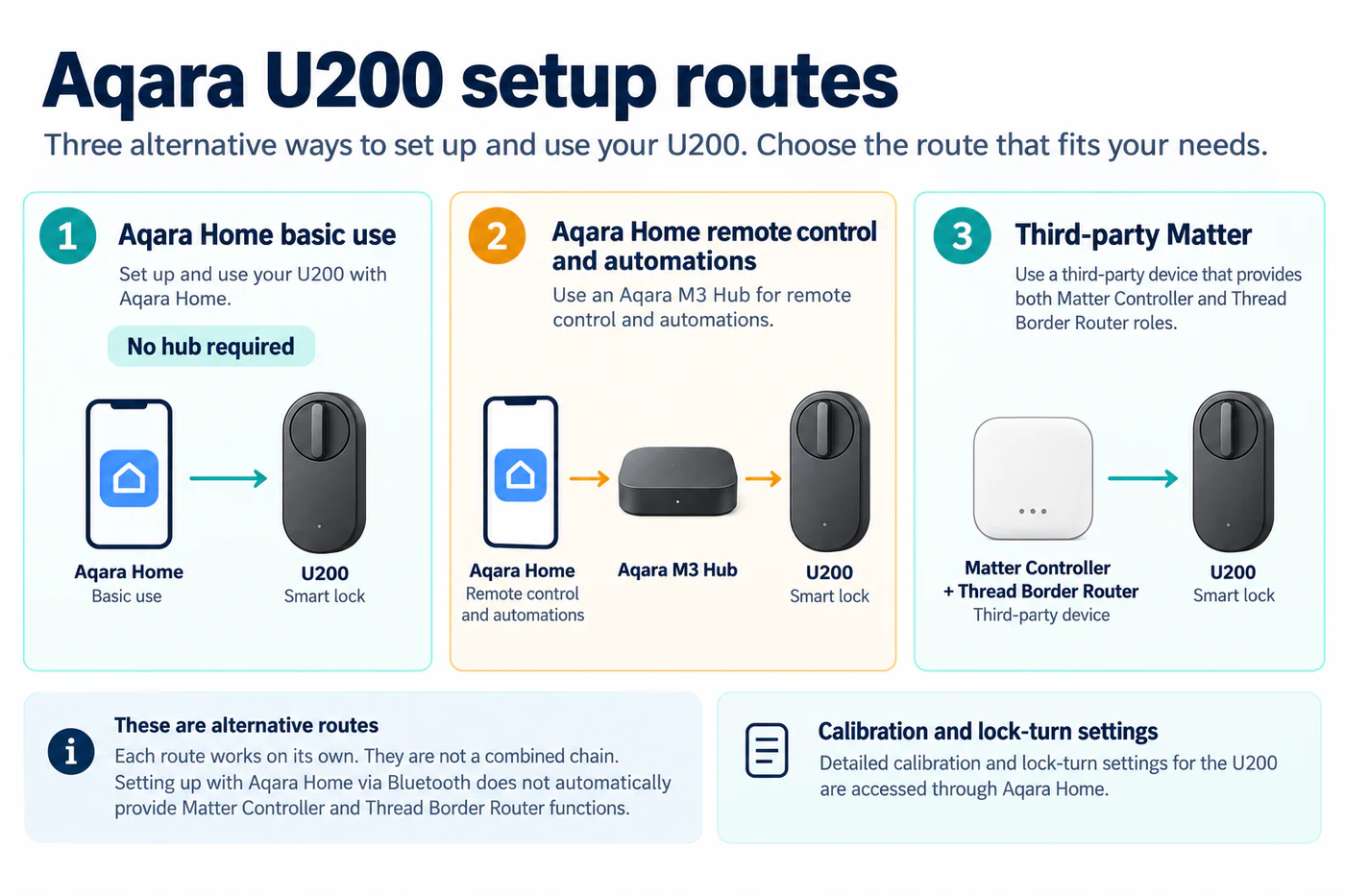
Aqara also says some detailed settings, including calibration and lock-turn features, are accessed through Aqara Home. Matter lock and unlock support therefore does not show that those settings will appear in another app. The no-hub Aqara Home path is separate from third-party Matter’s controller and Thread requirements. Test the controls in the ecosystem you intend to use and keep the Aqara app available for model-specific setup and updates.
For U400, distinguish Home Key from UWB approach unlock
U400’s Matter page lists Apple Home, Home Assistant, Google Home, Amazon Alexa, and SmartThings, and says that the selected Matter ecosystem needs its own Thread-enabled Matter controller. That is the base connectivity requirement for the chosen ecosystem; the lock still must be checked for the actions exposed by that controller.
Home Key and UWB approach unlocking are different Apple access methods. Aqara says UWB approach unlocking works only with selected iPhone and Apple Watch models and requires a Thread-enabled Apple home hub. The product page does not turn that requirement into a rule for all Apple Home locks. Home Key is listed as a tap-to-unlock option; verify the supported phone, watch, operating-system version, and current regional setup guidance before relying on it.
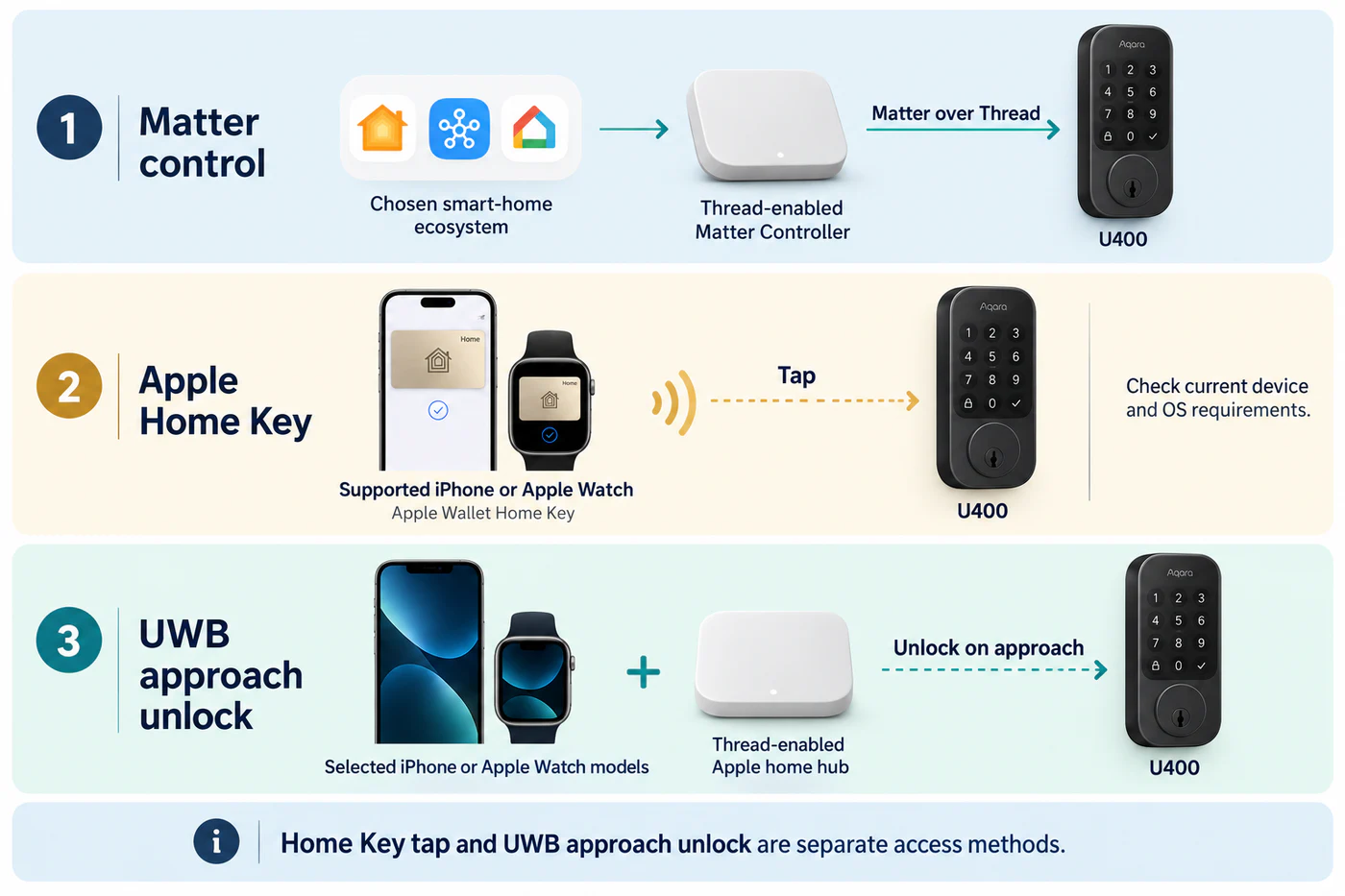
Aqara’s Canadian product page lists UWB compatibility for iPhone 11 or later except iPhone SE and iPhone 16e (iOS 18.5 or later), or Apple Watch Series 6 or later except SE (watchOS 11.5 or later). It also requires a Thread-enabled Apple home hub. These eligibility details come from the Canadian page; check the current page for your market and package before assuming the same requirements apply.
Samsung Wallet is a separate SmartThings path
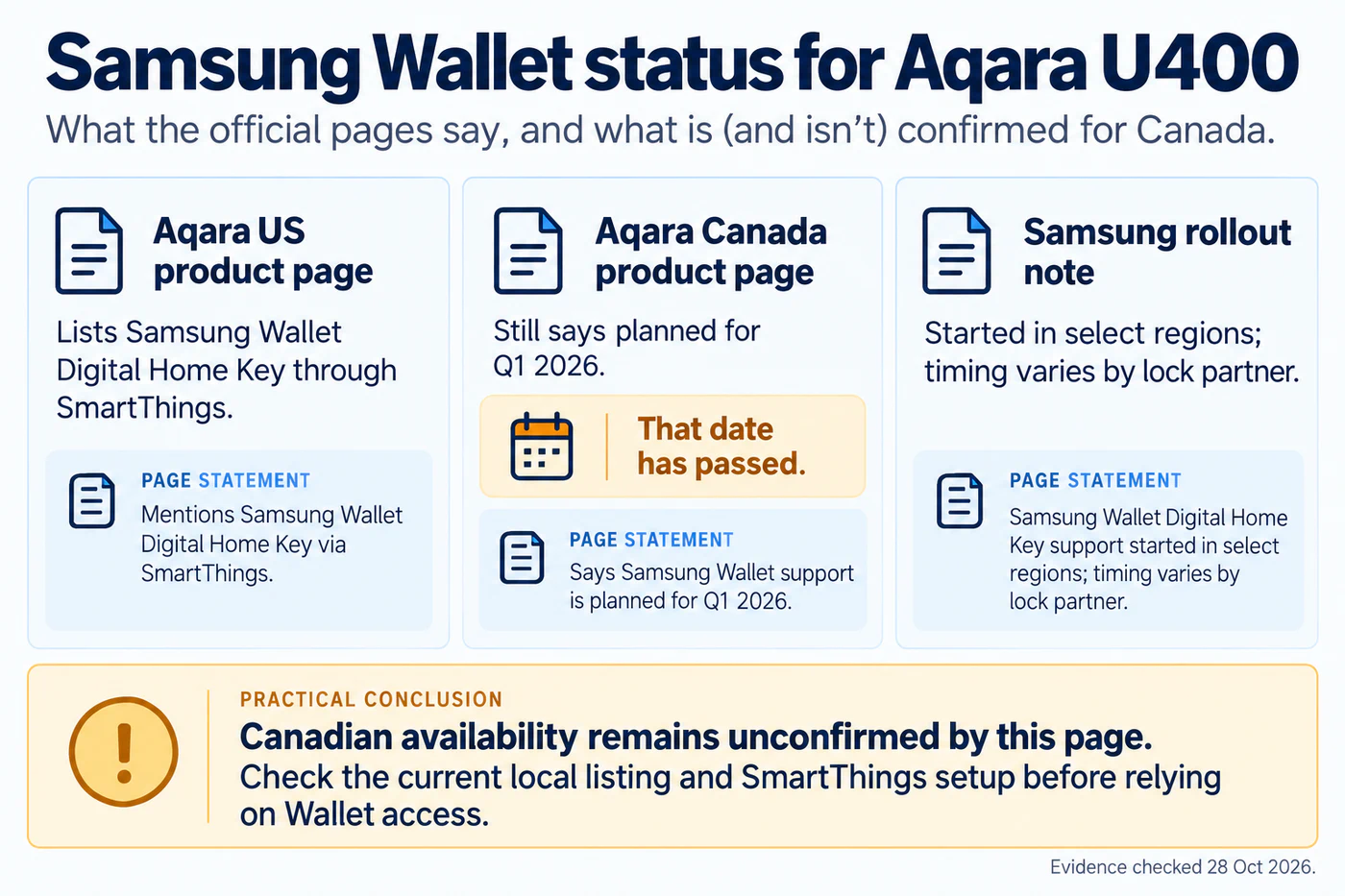
Aqara’s US U400 product page currently says the lock supports Samsung Wallet Digital Home Key through SmartThings. The Canadian product page still says Samsung Wallet support was planned for Q1 2026, although that quarter has passed. Treat the Canadian wording as stale and the current Canadian Wallet result as unresolved; it does not prove that support has launched or that it is unavailable. Samsung says its Digital Home Key rollout began in selected regions and follows each lock partner’s schedule. Aqara’s US statement also does not specify which Samsung Wallet access method is available for every package. Confirm the exact market, package, lock firmware, phone, Wallet version, and SmartThings setup before relying on it.
The Aliro and Matter guide explains why Wallet keys, Home Key, UWB, and Matter commands remain separate checks.
Check the physical model separately
The U200 and U400 use different hardware approaches and door requirements. Their electronic setup does not prove that either one fits your door. Before purchase, check Aqara’s U200 installation methods and U400 product information for the exact model and regional package. Then record the controller, Thread border router, firmware, and tested actions in the ecosystem feature matrix.
Reference material
Sources for this guide
- Smart Lock U400Primary
- Smart Lock U400, CanadaPrimary
- U200 Installation MethodsPrimary
- Intro to Home on iPhonePrimary
- Introducing Aliro 1.0Primary
- Samsung Wallet Digital Home Key launchPrimary