Smart Locks in Google Home
Understand what Matter lock support means in Google Home and why PIN, remote-unlock, and voice behavior must be checked separately.
Jump to a section
Google Home lists Matter door locks as a supported device type, but category support is only the starting point. The lock’s Matter implementation, Google Home controller and network path, and PIN configuration determine what you can do. Check locking, unlocking, PIN, voice, remote access, and status as separate capabilities.
What Google documents for Matter locks
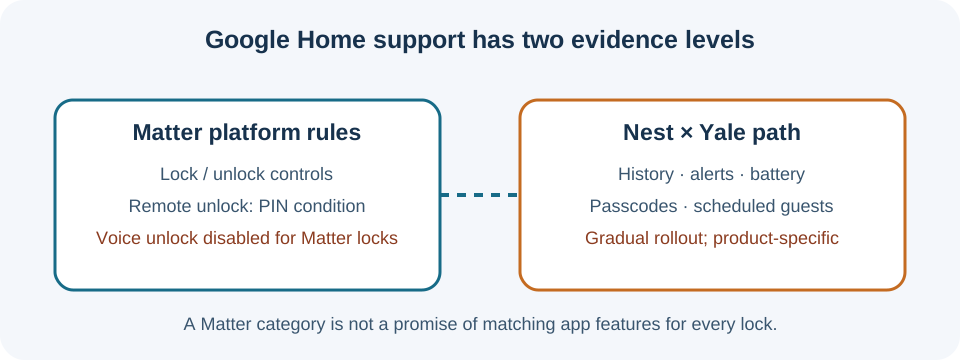
Google’s current Matter documentation identifies the Matter Door Lock device type and its Lock/Unlock cluster. The cluster maps to the lock and unlock controls exposed by Google Home. This establishes platform support for the standard device function; it does not certify every retail lock, every firmware revision, or every manufacturer-specific feature.
Google applies additional security restrictions to Matter locks. Remote unlock is disabled for Matter door locks that do not require a PIN, and voice unlock is disabled for Matter locks. A product listing that says “Google Home compatible” therefore does not guarantee that you can unlock it remotely or by voice. The PIN rule is a platform security condition, not a universal statement that every lock has the same PIN setup or guest-code controls.
Confirm the exact lock and controller
Before buying, check the manufacturer’s supported-ecosystem page for the exact model and region. Confirm whether it connects over Wi-Fi or Thread, whether a Matter-capable controller is needed, and whether the required hub also supplies Thread border-router service. A Matter controller and a Thread border router have different jobs even when one hub contains both.
Then compare the actions you need:
| Capability | What to verify |
|---|---|
| Lock and unlock | Is the exact model listed for Google Home, and does the current firmware expose both actions? |
| PIN | Does the lock require a PIN for unlock, and where are PINs created, changed, and removed? |
| Remote unlock | Does the setup meet Google’s PIN condition, and is remote access enabled for the lock and account? |
| Voice | Treat Matter voice unlock as unavailable in Google Home; do not infer it from generic voice-assistant marketing. |
| Status and alerts | Does Google Home show only lock state, or also door position, jam, battery, and event history? |
| Automations | Can this lock perform the specific action in the automation you plan to create? |
An app may show a capability that another controller does not. A manufacturer’s app can also retain settings such as PIN management or activity logs when Google Home exposes only basic lock controls.
Yale examples: Nest × Yale and Matter-enabled Yale locks
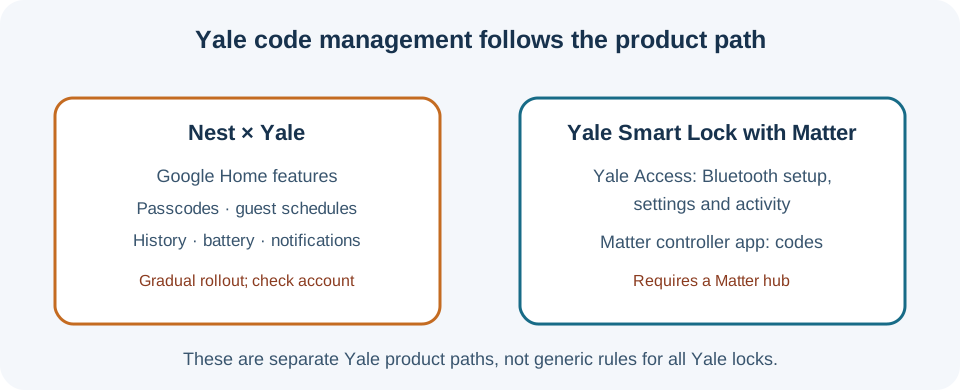
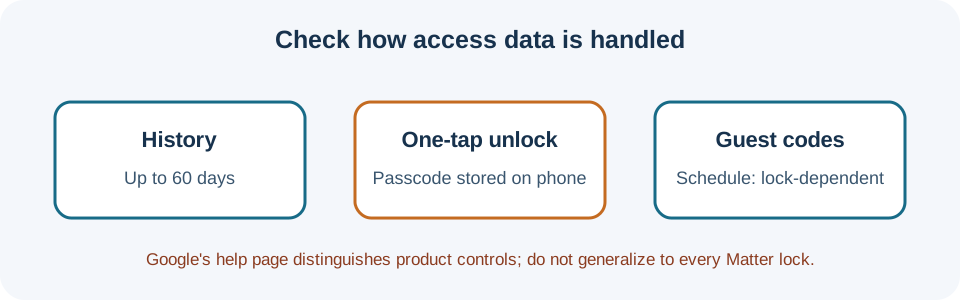
Google’s gradual rollout of Google Home controls for Nest × Yale names lock history, notifications, battery status, passcode management, scheduled guest access, and advanced settings. Google also lists tone, auto-lock, and one-touch locking for Nest × Yale. Availability may still vary during rollout. These controls are specific to this product path; they do not describe every Matter lock. Google says lock history can remain available for up to 60 days, and compatible locks may offer indefinite or scheduled guest passcodes. One-tap unlock requires a passcode stored on the phone; switching the feature off and on clears that saved code.
Yale’s separate Yale Smart Lock with Matter setup begins in the Yale Access app over Bluetooth, where the owner chooses Yale Access or a Matter platform. A Matter controller hub is required. Yale says codes and guest access move to the controller apps after Matter setup, while lock settings and activity remain in Yale Access. This is a named Yale product workflow, not a rule for every Yale lock or controller. Check the exact model and current app rollout before relying on code management or history.
Test security and access deliberately
During setup, first test lock and unlock locally. Configure a required PIN before evaluating remote access, and confirm how the app protects unlock commands. Test remote control while away from home only after you have verified the supported hub, network path, household permissions, and account security. Do not assume an automation that can report a lock’s state is also allowed to unlock it.
For a model-by-model worksheet, use the ecosystem feature matrix. For Matter, Thread, Wi-Fi, and hub terminology, see what each connectivity layer means.
Reference material